KiCAD importer
From KiCad schematic to FPGA: GateLab's new schematic import
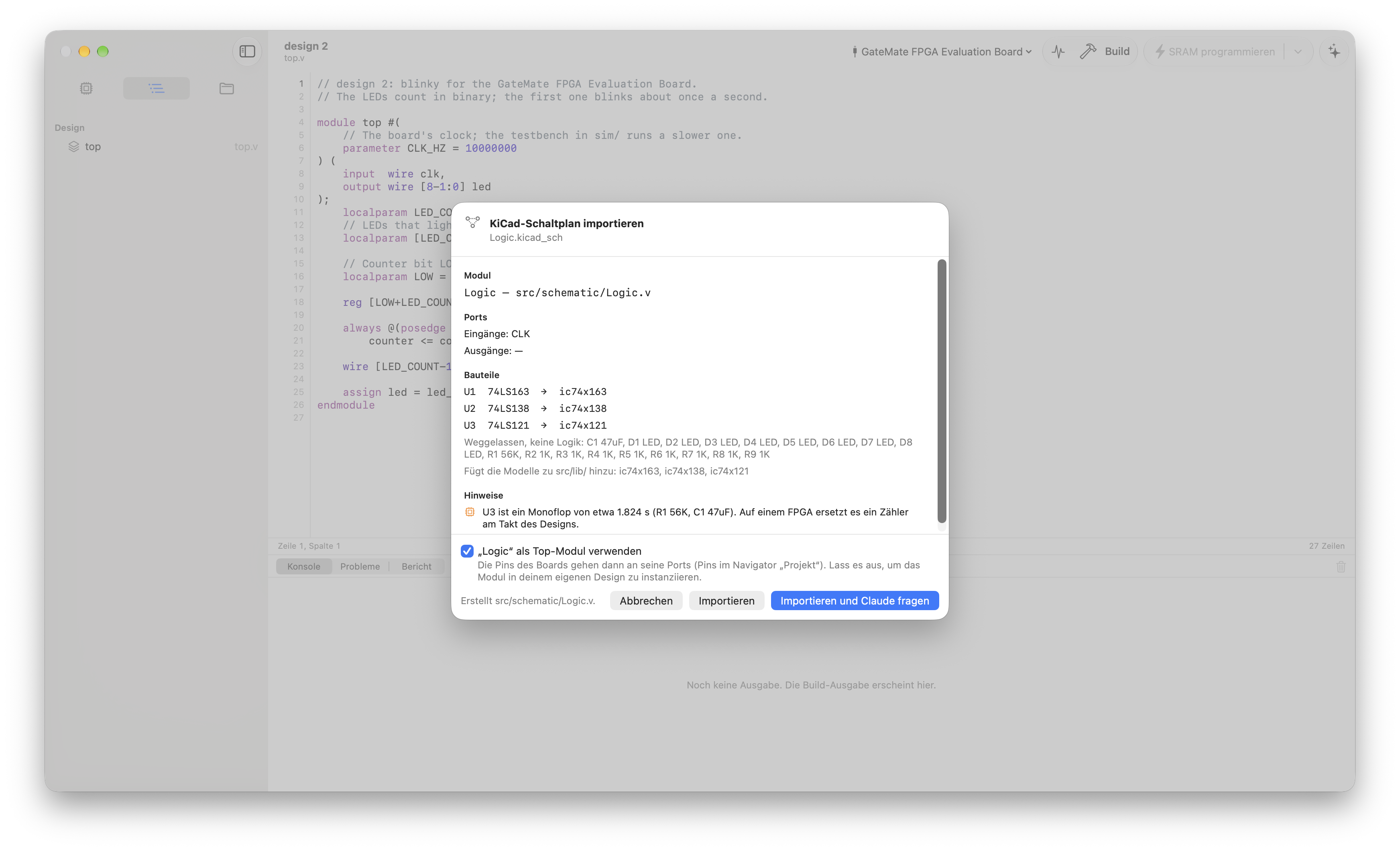
Many digital designs still start as a schematic: a counter, a decoder, a few gates and a one-shot, drawn in KiCad. Moving such a circuit onto an FPGA used to mean typing it into Verilog by hand and hoping nothing got lost on the way. GateLab now does that step for you, exactly and in seconds.
Exact, not guessed
GateLab doesn't read wires from a picture. It asks KiCad itself: KiCad's own command-line tool exports the netlist straight from your .kicad_sch, and GateLab turns it into structural Verilog.
- Parts: every logic part becomes an instance of a model.
- Nets: every net becomes a wire.
- Labels: labels on the root sheet and global labels become the module's ports.
- Power: VCC and GND become constants.
- Inputs: open inputs are tied high, the way TTL reads them.
The result behaves like the schematic, so it serves as the reference for everything that follows.
The parts come from GateLab 74xx Logic, a library of 7400-series models released under CC0. Each model has a testbench and a pin table, so even KiCad's unnamed gate pins land on the right port.
A report that knows FPGAs
A TTL circuit can work on the bench and still be the wrong design for an FPGA. The import report lists what needs attention:
- Gated and decoded clocks: a counter clocked from a decoder output. On an FPGA, use the real clock with a clock enable.
- Ripple counters: flip-flops clocked by other flip-flops.
- Asynchronous resets driven by logic: a glitch can clear the register.
- One-shots like the 74121: GateLab reads R and C from the schematic and computes the pulse, for example 39 kΩ · 10 µF ≈ 270 ms. An RC delay doesn't exist inside an FPGA; a counter replaces it.
- Open-collector outputs: wired logic needs an AND or OR on an FPGA.
Claude does the rest
With Import and Ask Claude, GateLab's built-in agent gets the generated module and the report. Claude:
- explains what the circuit does;
- writes a self-checking testbench and runs it;
- proposes an FPGA version in a file of its own: one clock, clock enables, synchronous resets, a counter instead of the one-shot.
The same testbench checks the FPGA version, so you know it behaves like the original. Through GateLab's MCP tool schematic_netlist, Claude can look up any net or part ("what drives CLK?") instead of guessing.
A live link back to KiCad
GateLab remembers the schematic. Change something in KiCad and press Save, and GateLab:
- exports the netlist again;
- shows what changed, for example "U5 added" or "net RST now also reaches U5.1";
- writes the structural Verilog again.
Your own files and Claude's FPGA version are only updated when you ask; one click on Ask Claude brings them up to date.
Tried on real hardware
I drew a 74HC163 counter driving a 74HC138 decoder and a 74121 one-shot in KiCad. We imported it into GateLab, let Claude write the testbench and the FPGA version, and ran it on a Cologne Chip GateMate evaluation board, built with the open-source toolchain (Yosys, nextpnr).
Try it
The KiCad import is part of GateLab Pro and needs KiCad 7 or newer installed. Use File ▸ Import KiCad Schematic… or drop a .kicad_sch on the project navigator.